

CCTV evidence sharing
CCTV footage, shared as evidence. Not burned to disc.
DekkoCORE gives the agencies that run CCTV one end-to-end encrypted place to receive footage requests from police, upload clips of any size, and share them with investigators, prosecutors and the judiciary. Clips play in the browser, access ends on a set date, and every view and download is recorded.
Day 1
Investigating police
Police request the footage through a form.
The investigator fills in the agency's footage request form in DekkoCORE: incident number, cameras, date and time window. The response is digitally signed with their account key, so the agency knows exactly who asked.
- Request forms made from the agency's own PDF
- Each response signed with the requester's key
- Requests kept with the footage they lead to
Footage request form
Incident26-104417
CamerasCAM 07, CAM 12
Window14 Oct, 22:38 to 22:46
Signed with the requester's key
Day 1
Agency CCTV team
The CCTV team exports and uploads the clips.
An operator exports the clips from the video management system and uploads them, however large, through the Upload Accelerator. Or saves them to a DekkoDrive folder that's already shared with the investigator, and they're shared as soon as they arrive.
- No file size limits
- Upload Accelerator for large and bulk uploads
- DekkoDrive folders that share on arrival
Export from the video management system
22:30In 22:38 · Out 22:4622:54
CAM07_2026-10-14_2238-2246.mp4
Upload Accelerator · 3.1 GB
Week 3
Prosecutors
The clips go into the brief, not onto a disc.
When the brief of evidence goes to prosecutors, the agency shares the same clips with them, View only. Defence lawyers can be given access the same way when footage is disclosed, each with their own expiry date.
- The same file, shared again, not copied
- Separate access and expiry for each party
- Outside parties can't see each other
One clip, shared again
- Investigating policeView only
- ProsecutorsView only
- Defence lawyersView only · until 30 Mar
No new copies · Each party has its own expiry
Hearing
The judiciary
Played in the courtroom, and checked if copied.
The footage is played in the courtroom from the secure viewer. If a downloaded copy is tendered, anyone can check it against the original with DekkoSecure's file validator: a match shows where it came from, and any change since download shows as no match.
- Played from the secure viewer
- Downloaded copies checked against the original
- Every view of the clip on its file history
Downloaded copy checked: Match · Owner: Transit CCTV Unit
After the matter
Agency records team
Kept for as long as the schedule says.
Outside access has expired. The agency's data expiration policy sets a maximum lifetime for the footage, and the audit log keeps the record of everyone who viewed or downloaded it.
- Data expiration policy, set in days
- Shares that expire on their own
- Audit log exportable as CSV
Access and retention
Investigating policeExpired
ProsecutorsExpired
Defence lawyersExpired
FootageKept to the agency's schedule
Audit log kept, exportable as CSV
Access log
Each party sees the footage they need, for as long as they need it.
An example of how an agency might set up access. The CCTV team decides, clip by clip, and can change or revoke access at any time.
- [22:38:40]Agency CCTV teamTeam Members · Upload, share and manageReceive requests, upload clips and decide who sees them.
- [22:39:20]Investigating policeExternal Members · View only, or DownloadPlay clips in the browser; download native exports when needed.
- [22:40:00]ProsecutorsExternal Members · View onlyThe same clips, shared again for the brief of evidence.
- [22:40:40]Defence lawyersExternal Members · View only, with expiryDisclosed footage, with access that ends on a set date.
- [22:41:20]The judiciaryExternal Members · View onlyFootage to view ahead of and during a hearing.
File validator
Show the copy is the footage you shared.
DekkoCORE stores a hash of every file. Anyone holding a downloaded copy can check it with DekkoSecure's file validator. A match shows where the file came from; a copy that's been changed since download won't match.
System status
Built for footage that becomes evidence.
- Hosted in Australia, IRAP assessed
- DekkoCORE is hosted in-country and IRAP assessed for Australian government PROTECTED information.
- Zero-knowledge, end to end
- Footage is encrypted on the device that uploads it. DekkoSecure can't view it, and neither can anyone outside the share.
- Copies you can check
- A hash of every file is stored, so a downloaded copy can be checked against the original with the file validator, independently of the platform.
- Classification markings
- Mark footage OFFICIAL: Sensitive or PROTECTED, and require a marking on every upload.
- Hubs open only from where you allow
- Region protection is an IP-based allow-list for every Hub: a first line of defence, alongside sign-in.
- A record for oversight
- Every view and download is logged. Export the logs as CSV or stream them to your Log Analytics workspace.
In the product
Volume and views, on the record.
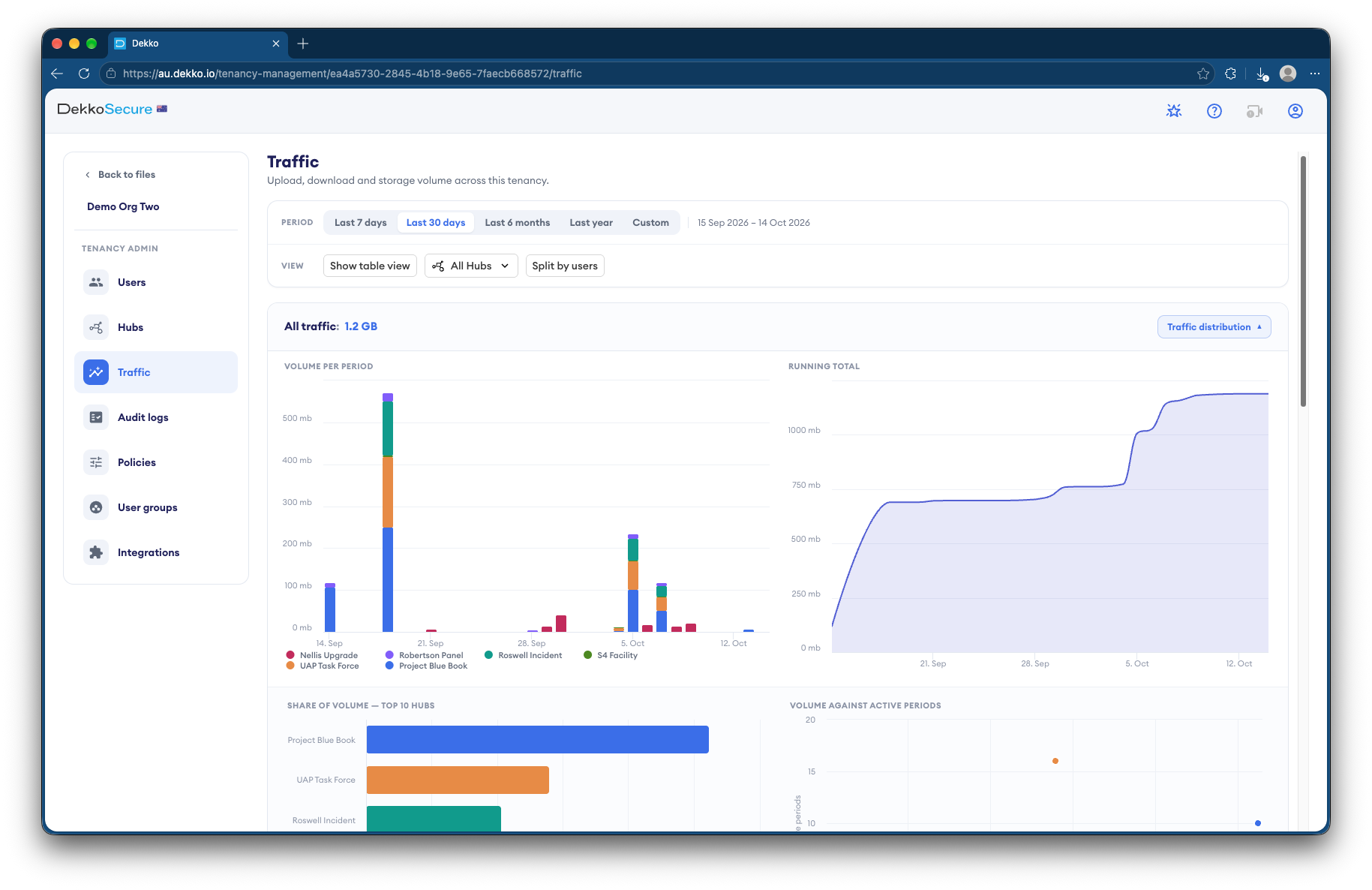
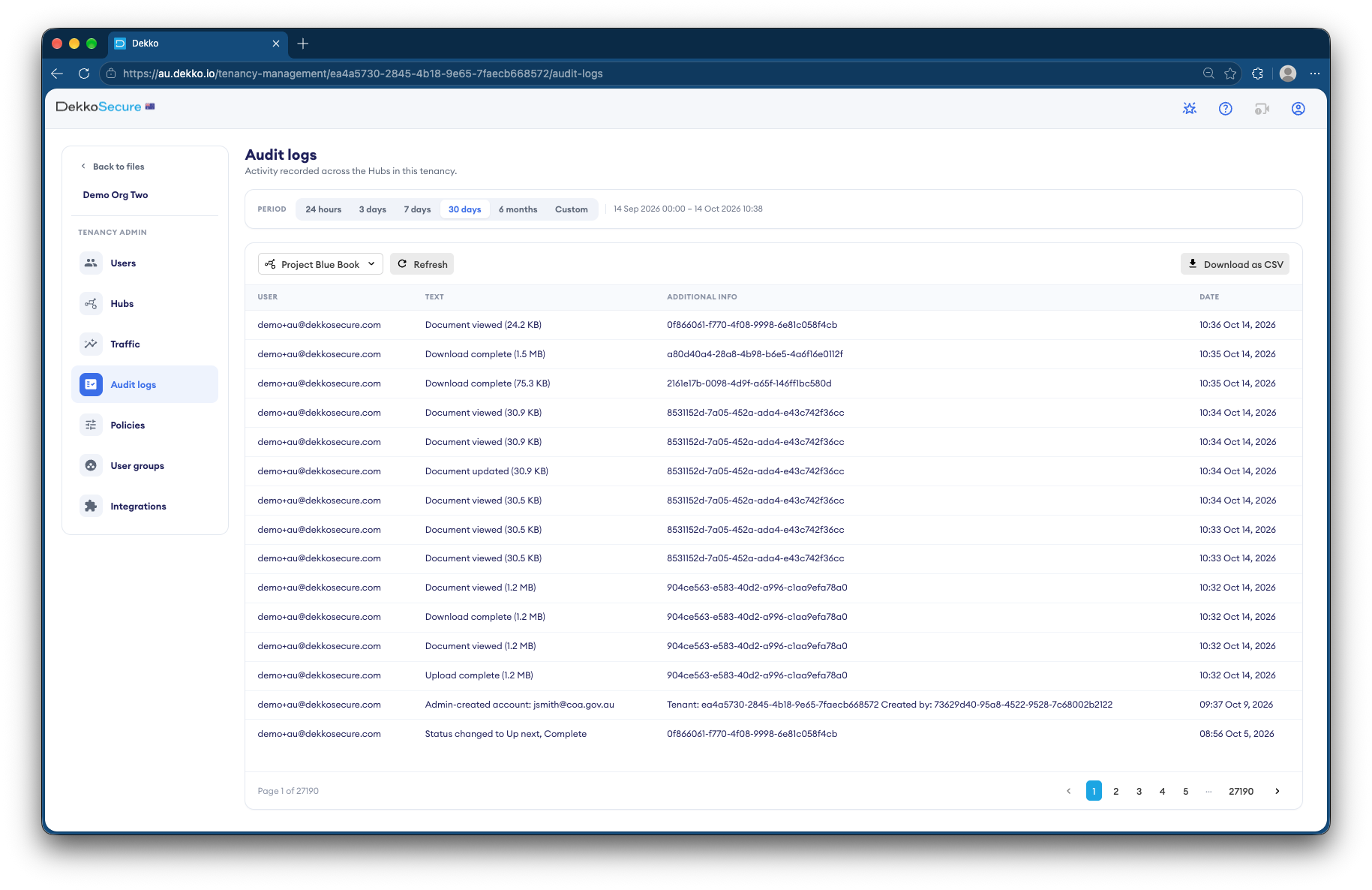
Transcript
Asked by agencies and investigators.
Which video formats play in the browser?
MP4 plays in DekkoCORE's secure viewer, so it can be shared View only. Proprietary exports from a video management system, and their players, can be shared too, with Download access for the people who need them.
Is there a limit on file size?
No. DekkoCORE has no file type or size limits, though your tenancy can set one. The Upload Accelerator for Windows is built for large and bulk uploads, and DekkoDrive can sync an export folder.
How do we show a copy hasn't been changed?
DekkoCORE stores a hash of every file. Anyone holding a downloaded copy can check it with DekkoSecure's file validator: a match shows the file's owner, and a copy that's been changed since download won't match. DekkoSecure doesn't access the file to check it.
Do police officers need an account?
Yes, to sign in and see footage shared with them. They're invited to the agency's Hub as External Members, and their own organisation doesn't need a subscription.
Can different police units see each other's requests?
No. External Members only see the agency's Team Members, not other External Members, even when the same footage is shared with them.
Where is the footage stored?
In Australia, for Australian agencies. DekkoCORE is hosted in-country and IRAP assessed for Australian government PROTECTED information.
End of recording
Retire the disc burner.
Show us how footage requests reach your CCTV team today. We'll set up the same path in DekkoCORE, from request form to the courtroom, with the record in one place.