Skip to content

Collect claim evidence from anyone.Share it with only the right people.

DekkoCORE gives insurers a secure link or QR code that policyholders, witnesses and third parties use to upload photos, video and documents straight into a claim folder, with no account or app. Your claims team then shares each claim with loss adjusters, assessors, investigators, lawyers and reinsurers at the access level each one needs, and every view and download is recorded.

An example claim, CLM-2026-48213: 08:14, Policyholder: Sent 6 photos and a statement (No account); 08:31, Claims handler: Shared the claim with a loss adjuster (Download + Upload); 11:40, Builder: Viewed roof_damage_03.jpg (View only); 15:05, Loss adjuster: Added assessment_report.pdf; Day 30, Reinsurer: Access ended on its expiry date (Expired).

The story of one claim

From the storm to the settlement.

Follow claim CLM-2026-48213 through six moments, and see what DekkoCORE does at each one.

Chapter 1 of 6

A storm hits overnight.

By morning, thousands of policyholders have damaged roofs. Every claim needs photos, quotes and statements before anyone can assess it, and today most of that evidence arrives by email, then gets forwarded to everyone else who needs it.

Inbox · claims@6 messages
  • Claim 48213: photos

    6 attachments · 31 MB

  • Undeliverable: Claim 48213: photos

    Message too large

  • Claim 48213: photos (1 of 3)

    Resent in parts

  • Fwd: Claim 48213: photos (1 of 3)

    To the loss adjuster

  • Fwd: Fwd: Claim 48213: photos (1 of 3)

    To the builder, and their office

  • RE: Fwd: Fwd: Claim 48213: photos

    Who else has these?

  • Slow.

    Every bounced attachment or forgotten password adds days before the claim can be assessed.

  • Exposed.

    Identity documents, bank details and medical reports end up in inboxes you don't control.

  • Unaccountable.

    Once a copy is forwarded, nobody can say who has it or what they did with it.
Chapter 2 of 6

One link. No login.

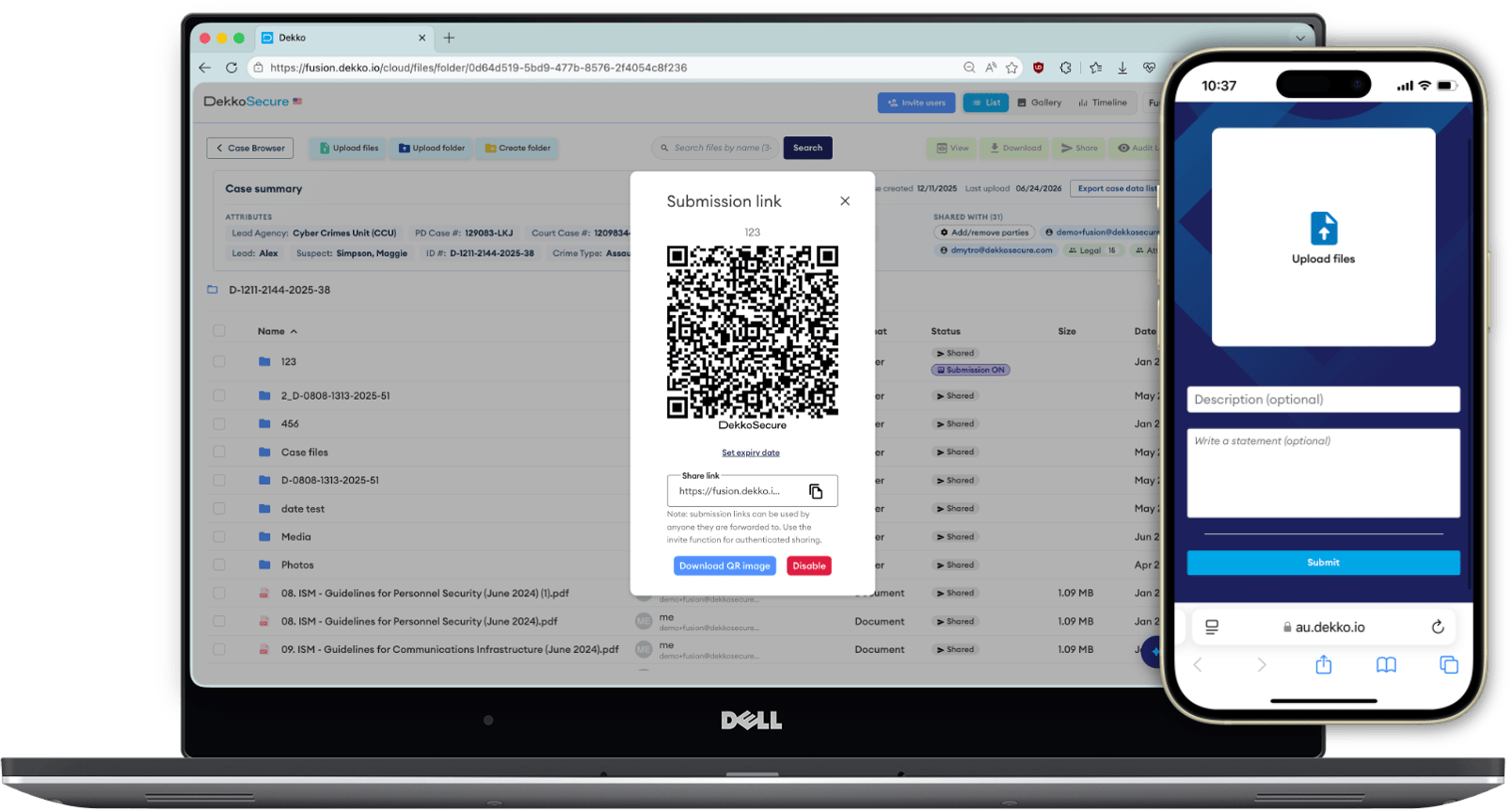
Your claims team sends the policyholder a secure link in a text or email, and puts the QR code on the claims page. The policyholder opens it on their phone, takes six photos of the ceiling, adds a short statement and presses Submit. No account, no app, and they never see anything but the upload page.

The submission link dialog with its QR code, an expiry date setting, the share link and a Disable button
What your team shares
The upload screen a policyholder sees on their phone, with Upload files, Description and Statement fields and a Submit button
What the policyholder sees

What DekkoCORE does here

  • No account, password or app
  • Secure link, QR code, or both
  • Photos and video straight from the phone camera
  • Set an expiry date, or turn the link off instantly

Chapter 3 of 6

It lands in the claim.

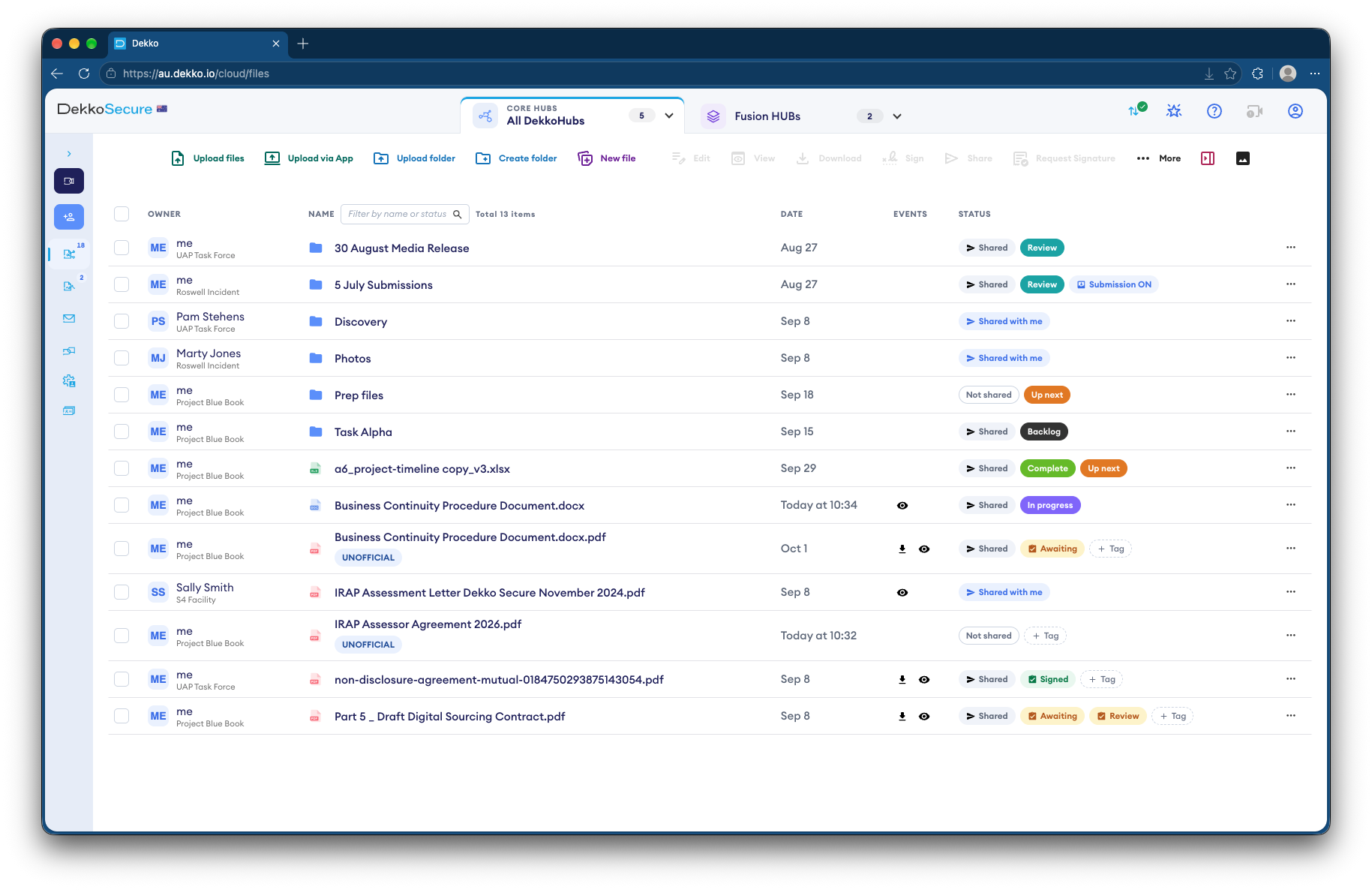
The submission arrives in its own folder inside the claim, with a report of when it was sent, from what device and from roughly where. The claims handler opens the photos in the browser, without downloading a copy, and renames the folder to the claim number.

DekkoCORE file list showing claim folders with Shared, Review and Submission ON status tags

What DekkoCORE does here

  • One folder per submission, with a submission report
  • The statement kept with the files
  • Photos and documents open in the browser
  • Uploads scanned for malware

Chapter 4 of 6

The right people get the right access.

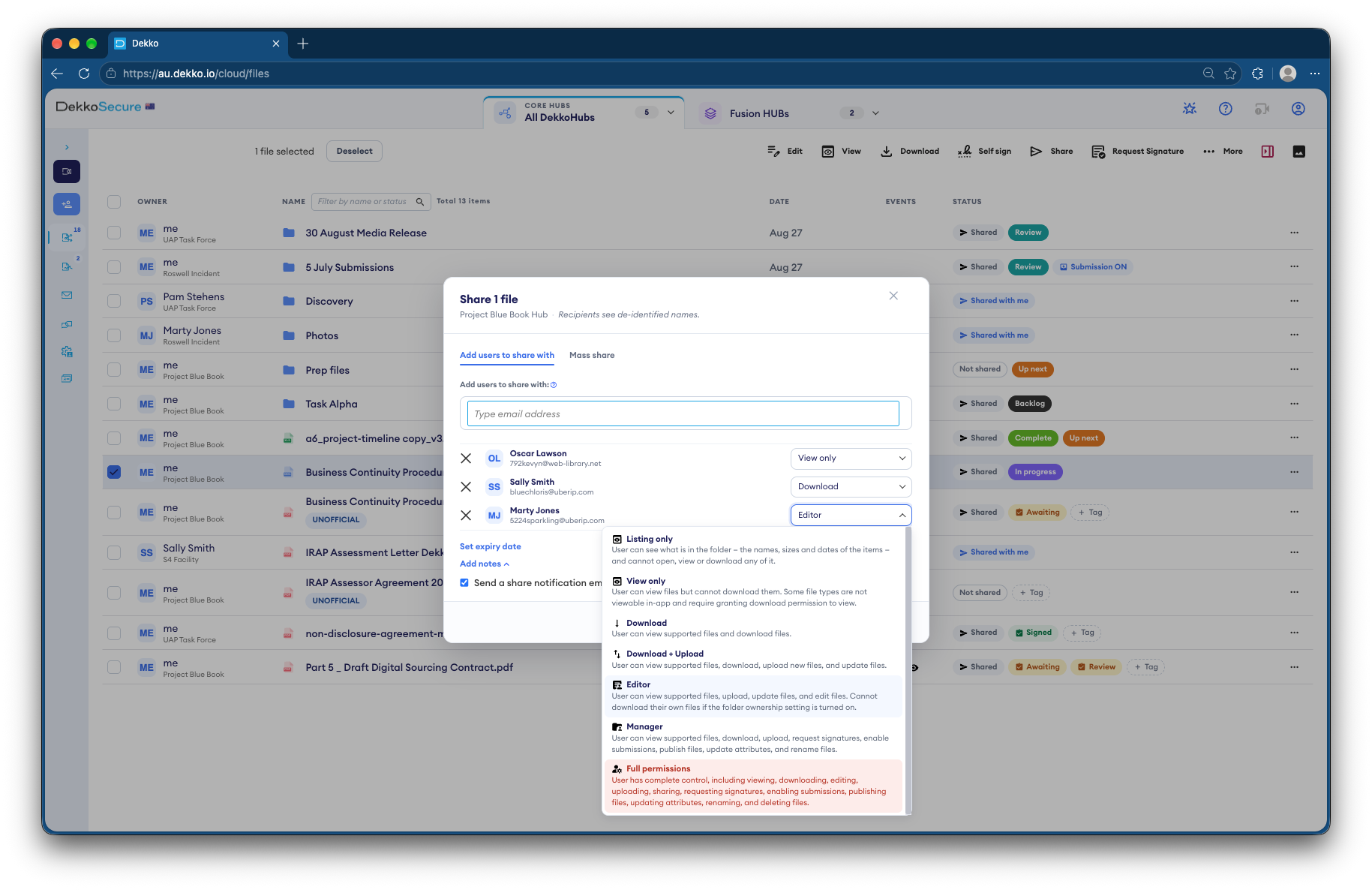
The handler shares the claim. The loss adjuster can download the evidence and add a report. The builder can only view the damage photos. The reinsurer gets view-only access that ends after 30 days. Nobody receives a copy: they receive access, which can be changed or revoked at any time.

DekkoCORE share dialog giving three recipients different permission levels, with the list of seven levels from Listing only to Full permissions

An example of how an insurer might set up access. You choose the level for each person, and can change or revoke it at any time.

Swipe the table to see what each person can do

Example access for each party to a claim, and what each level lets them do
WhoLevelSend files inViewDownloadAdd filesReshare
Policyholders and claimantsSend evidence in. They never see the claim folder.Public submission linkYesNoNoNoNo
Witnesses and third partiesSend photos, dashcam footage or statements without an account.Public submission linkYesNoNoNoNo
Claims handlersReview submissions, organise the claim and share it with others.ManagerNoYesYesYesYes
Loss adjustersReview the evidence and add their reports to the claim.Download + UploadNoYesYesYesNo
Assessors, builders and repairersSee the damage photos and quotes they need to scope the work.View onlyNoYesNoNoNo
InvestigatorsReview the evidence for a suspected fraud without taking copies.View onlyNoYesNoNoNo
Panel lawyersTake the documents they need for advice or proceedings.DownloadNoYesYesNoNo
ReinsurersReview a large loss for a set period, then lose access automatically.View only, with an expiry dateNoYesNoNoNo

All seven levels, least to most access: Listing only, View only, Download, Download + Upload, Editor, Manager, Full permissions.

What DekkoCORE does here

  • Seven permission levels
  • Expiry dates on every share
  • Share notes and notifications
  • Recipients see de-identified names

Chapter 5 of 6

The work happens, and every step is recorded.

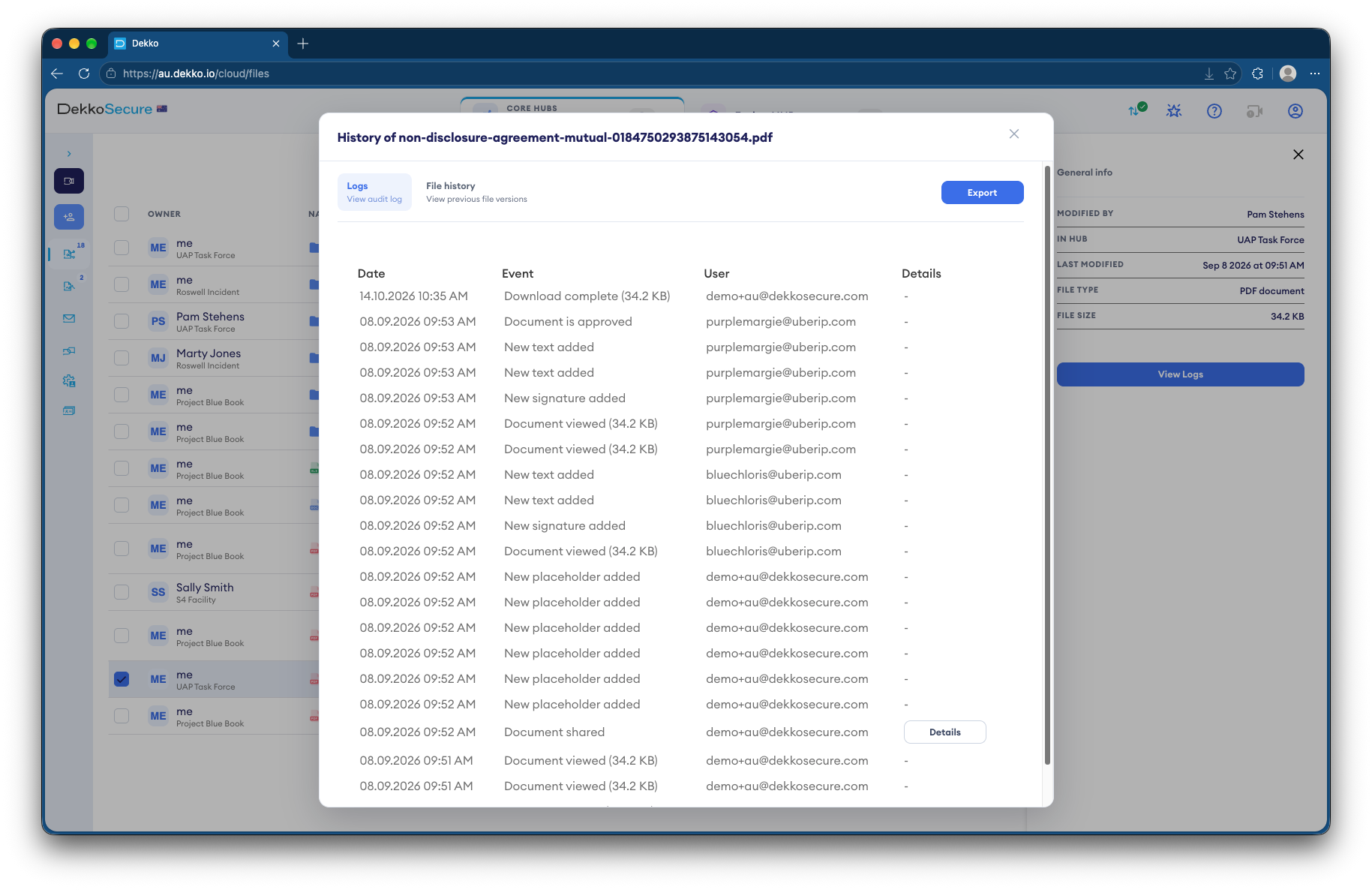
The builder views roof_damage_03.jpg to scope the repair. The adjuster adds assessment_report.pdf. Every view, download and upload is logged against the file, so the claim's history is always one export away.

DekkoCORE file history listing each view, signature, approval and download with the date and the user

What DekkoCORE does here

  • Per-file history of every view and download
  • Previous versions kept
  • One-click export
  • Tenancy-wide audit logs, as CSV or streamed to Log Analytics

Chapter 6 of 6

Settled, and closed off.

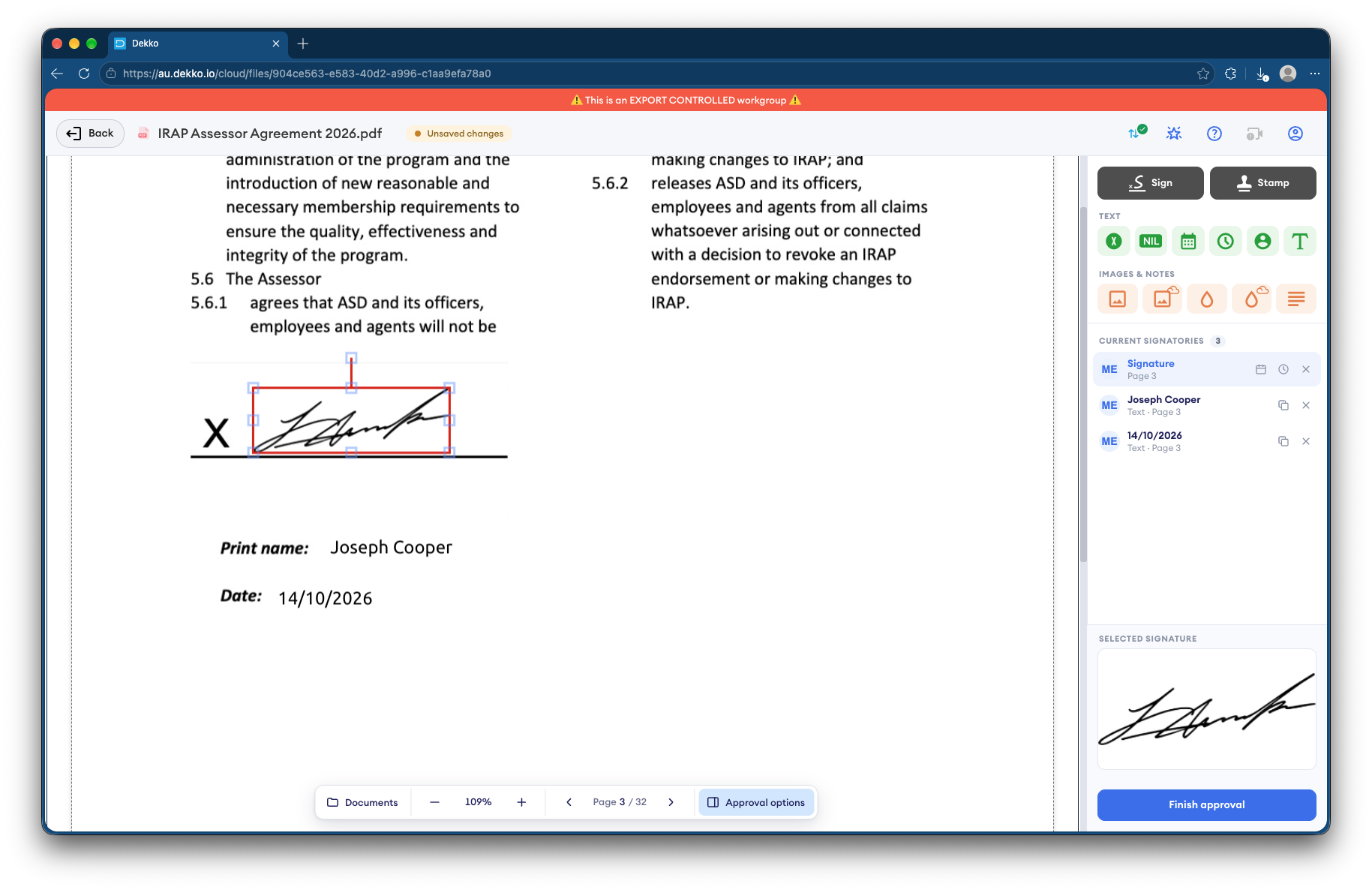
The settlement documents are signed in the browser. The reinsurer's access ends on schedule, with nobody having to remember to remove it. If a complaint, dispute or audit comes later, the whole history of the claim is ready.

Signing a document in DekkoCORE: a signature on the signing line, the list of current signatories and a Finish approval button

What DekkoCORE does here

  • Sign and approve in the browser
  • Access ends automatically on its expiry date
  • The claim's full history, ready to export

Lines of business

Every line of business has a version of this story.

  • Catastrophe events

    After a storm, flood or bushfire, publish one QR code at recovery centres and in your messages to policyholders. Every submission arrives in its own folder, ready to triage.

    • Damage photos
    • Video walk-throughs
    • Statements
  • Motor

    Collect photos from the scene, dashcam footage from witnesses and quotes from repairers, then give the assessor view-only access.

    • Scene photos
    • Dashcam footage
    • Repair quotes
  • Home and property

    Policyholders upload damage photos, invoices and receipts from their phone. Builders and adjusters see only the claims they're working on.

    • Invoices
    • Receipts
    • Builder quotes
  • Injury and income protection

    Receive medical reports and payslips without email, and share them with medical assessors on view-only access.

    • Medical reports
    • Payslips
    • Certificates
  • Fraud investigations

    Give internal and external investigators view-only access to the evidence, with a record of everything they opened.

    • Original submissions
    • Submission reports
    • File history
  • Large losses and reinsurance

    Share the full loss file with reinsurers and brokers for a set period, without sending copies outside your control.

    • Loss assessments
    • Adjuster reports
    • Site photos and plans

Before you sign off

The facts, and what your risk committee will check.

In short

What it is
A secure way to collect claim evidence from the public and share it with everyone working on the claim.
Who submits
Policyholders, claimants, witnesses and third parties. No account, password or app needed.
How they submit
A secure link or QR code. Files, a written statement, or both, from any phone or computer.
Who you share with
Loss adjusters, assessors, repairers, investigators, panel lawyers, brokers and reinsurers.
How access works
Seven permission levels, from listing only to full permissions, with expiry dates and instant revocation.
Security
End-to-end encrypted and zero-knowledge: DekkoSecure can't read your claim files. IRAP assessed to PROTECTED.
Hosting
In-country in Australia, the United States or Canada.
What it replaces
Email attachments, consumer file-sharing links, USB drives and portals claimants won't log in to.

Risk and compliance

  • DekkoSecure can't read claim filesZero-knowledge: only the people you share with can open them.
  • Files are encrypted end to endBefore they leave the sender's device, public submissions included.
  • Data stays in the country you chooseHosted in-country in Australia, the United States or Canada.
  • Independently assessedIRAP assessed for Australian government PROTECTED information.
  • Sign-in is enforcedTwo-factor authentication, passkeys and single sign-on across your tenancy.
  • Uploads are scannedMalware scanning over ICAP; infected files can't be downloaded or shared.
  • Every action is loggedPer-file history and tenancy-wide audit logs, exportable or streamed to Log Analytics.
Read about DekkoCORE security

Questions

Common questions.

Do policyholders need an account or app to submit a claim document?

No. They open the secure link or scan the QR code in any web browser, add their files and an optional description and statement, and press Submit. On a phone they can take photos and video with the camera as part of the submission.

Can a claimant see other claims or other people's submissions?

No. The submission page only accepts uploads. Claimants don't see the claim folder, other submissions or anything else in your DekkoCORE tenancy.

How do we know which claim a submission belongs to?

Turn on public submissions for each claim's folder and send that claim's link, or ask claimants to enter their claim number in the description. Every submission creates its own folder named from the description, with a report of the date, time, device and file list.

Are public submissions verified?

Public submissions aren't tied to an account, so treat them like any evidence you receive from the public and verify them as part of your claims process. For known parties who send files regularly, such as loss adjusters, share the folder with them using their own authenticated account instead.

How do we stop a submission link being misused?

Set an expiry date on the link, turn it off instantly when the claim no longer needs it, and only send it to the people you need evidence from. Administrators can set file size limits, and with malware scanning turned on, infected files are flagged and can't be downloaded or shared.

Who can open our claim files?

Only the people you share them with, at the permission level you choose. DekkoCORE is end-to-end encrypted and zero-knowledge, so DekkoSecure itself can't read your files.

Can we show who accessed a claim file?

Yes. Every view, download, signature and approval is logged against the file and can be exported. Tenancy-wide audit logs can be downloaded as CSV or streamed to your Log Analytics workspace.

Where is claim data stored?

DekkoCORE is hosted in-country in Australia, the United States and Canada, so claim data can stay in the country you choose.

Does DekkoCORE replace our claims management system?

No. Your claims system stays the record of the claim. DekkoCORE handles the files around it: collecting evidence from people outside your organisation and sharing it securely with everyone working on the claim.

Next step

See it on one of your claims.

Walk us through how evidence reaches your claims team today. We'll show you public submissions and controlled sharing working on that same workflow.