

Share the drawing,not the right to keep it.
DekkoCORE lets engineering and design teams share drawings, models and specifications with clients, contractors and fabricators at exactly the access each one needs. Files of any size go up through the Upload Accelerator, and every view and download is recorded.
Layer · Access
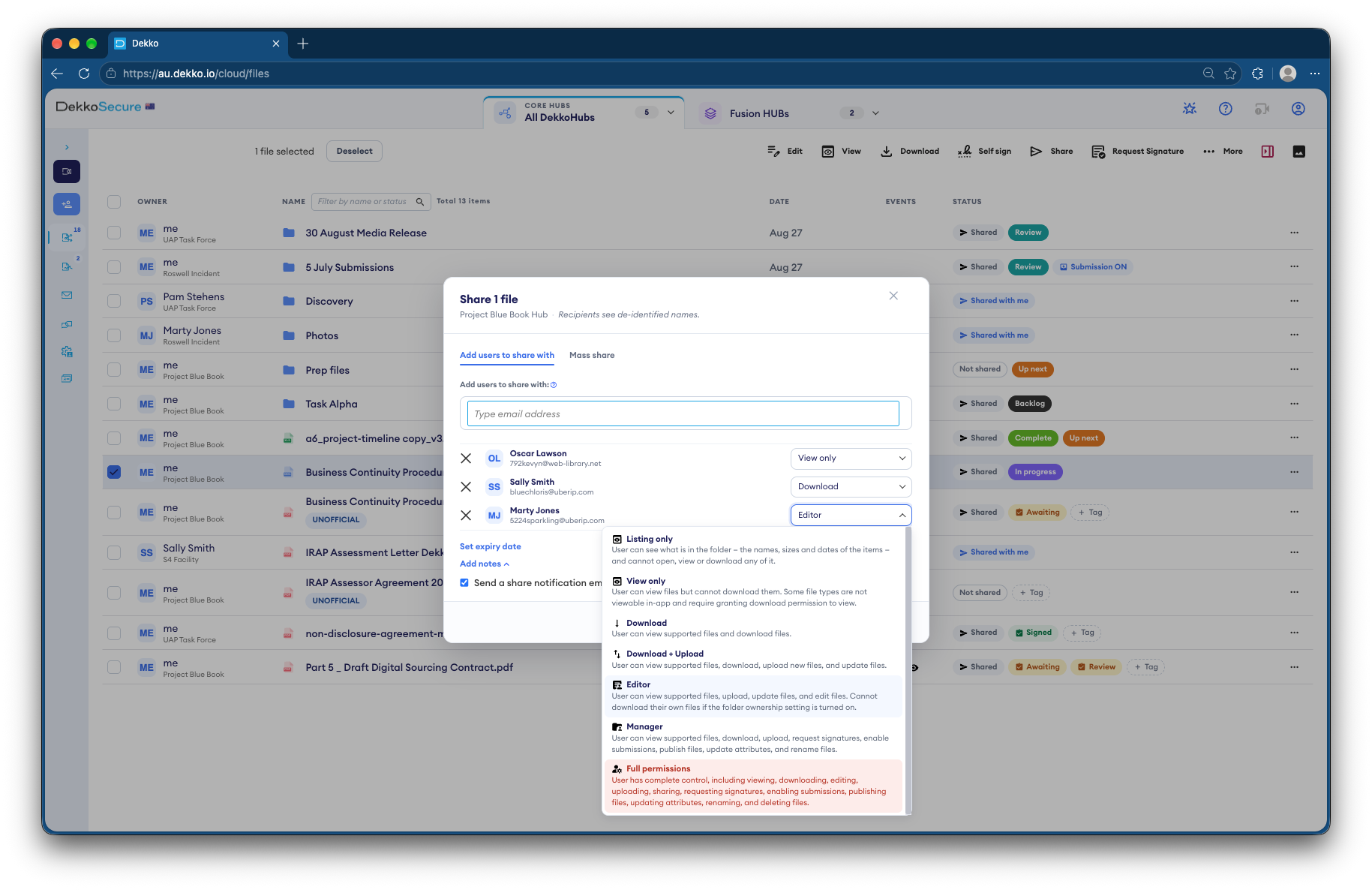
Seven levels of access. Pick one.
Every person you share with gets one of seven levels, set file by file or folder by folder. Choose a layer to see what a recipient of this drawing could do.
Properties · what they can do
Layer · Large files
Big files, sent whole.
Models, point clouds, drawing sets and factory test videos go up as they are, without splitting or a file transfer service. The Upload Accelerator, a Windows app, is built for large and bulk uploads.
Layer · Revisions
From first issue to project close.
Follow drawing set GA-1042 through its revisions, and see who has what access at each one.
- 03 Feb
Issued for client review
The design team uploads the drawing set and shares the PDF drawings with the client View only. The client reads and marks them up in the secure viewer, and their access ends when the review does.
Client project teamView only, until 28 Feb
- 17 Feb
Client comments included
The updated drawings replace the earlier issue in the same folder. The earlier versions stay in each file's history, so nobody works from the wrong sheet and nothing is lost.
Design teamEditor
- 02 Mar
Issued for fabrication
The fabricator gets Download access to the drawings and the native 3D model they need to cut steel. Other subcontractors get Listing only: they can see the package exists without opening it.
FabricatorDownload, until project close
- 30 Jun
Project closed
Shares reach their expiry date and outside access ends automatically. The files stay with the design team, and the audit log shows every view and download along the way.
Everyone outside the design teamExpired
Layer · Protections
Built for designs you can't afford to lose.
- No file size or type limits
- Upload drawings, models, scans and video of any size. Your tenancy can set its own upload limit if you want one.
- External sharing, switched off per Hub
- Restrict external uploads and sharing in a Hub that holds your most sensitive designs, whoever else works in it.
- A banner on every screen
- A tenancy banner of up to 200 characters, such as a commercial-in-confidence notice, shows at the top of every Hub.
- Export control labels
- Mark files OFFICIAL - Export Controlled or Not Export Controlled, and require a label on every upload.
- Every upload scanned
- Cloud-based malware scanning over ICAP checks files from subcontractors as they arrive.
- Zero-knowledge, end to end
- Every file is encrypted on the device that uploads it with its own key. DekkoSecure can't open your designs.
Layer · In the product
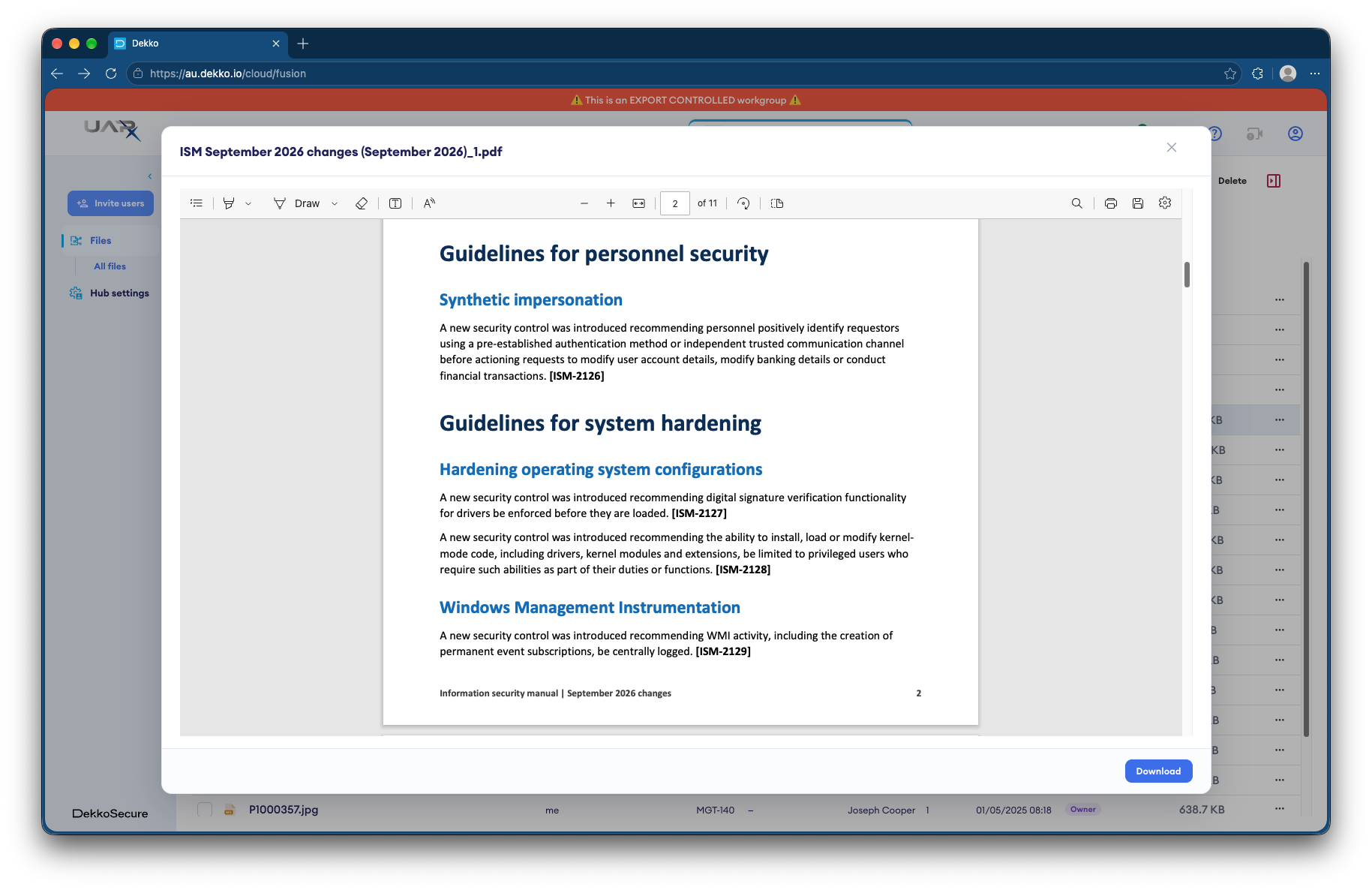
Sharing, and the secure viewer.
Layer · Questions
Asked by engineering and design teams.
Can recipients view CAD files without downloading them?
The secure viewer opens PDF, Word, Excel, PowerPoint, text, image (including SVG), MP4 and MP3 files. Native CAD formats such as DWG or STEP aren't viewable in the browser, so share PDF exports View only and give Download access to native files only to the people who need them.
Is there a file size limit?
No. DekkoCORE has no file type or size limits, though your tenancy can set one. Very large uploads take time on a slow connection, which is what the Upload Accelerator for Windows is for. For more than 200 files, zip them first.
What's the difference between Listing only and View only?
Listing only shows that files exist, with their names, sizes and dates, and nothing more. View only lets the person open supported files in the secure viewer, but not download them.
Can a contractor reshare our drawings?
Only people with Manager or Full permissions can reshare. A Hub can also restrict external uploads and sharing altogether, and every share is recorded in the audit log.
What happens when a share expires?
Everyone it was shared with loses access automatically. The file isn't deleted, and your own access doesn't change.
Can we sync design folders to our file server?
Yes. DekkoDrive for Windows keeps a Hub's folders in step with local or network storage, encrypting and decrypting as it goes, and files placed in a shared folder are shared automatically.
Layer · Next issue
Send us your heaviest drawing set.
Tell us who needs to see your designs and who needs to keep them. We'll set up the access levels, expiry dates and Hubs to match, with large uploads ready to go.