Skip to content

Every partner gets a row.None of them sees the plate.

DekkoCORE gives biotech and pharmaceutical companies one end-to-end encrypted place to share a drug program with the partners who move it forward: university labs, CROs, contract manufacturers, trial sites, safety boards and licensing partners. Each partner sees only the files shared with it, at the level you set, for as long as its agreement runs, and every view and download is recorded.

PLT-EXB214 · EXB-214Partner plate

See the plate as

The plate map

Read it like a plate map.

Before a run, a scientist fills in a plate map: what goes in every well. Here each row is a partner, each column is a file from the program, and each filled well is a partner that can open that file. Row A has a gap at column 10: your own team can't open the unblinded tables.

Without a map, unpublished results and process know-how travel as attachments. One forward too many can cost a patent its novelty, and an email can't be called back.

Rows: the partners

A
Your team. Example Bio's R&D and program team
B
University lab. An academic collaborator under a research agreement
C
Assay CRO. A contract research organisation running the binding assays
D
Tox CRO. A contract research organisation running the toxicology studies
E
CDMO. A contract manufacturer making the clinical batches
F
Trial sites. The investigator sites running the Phase 1 trial
G
Safety board. The independent data safety monitoring board
H
Licensing partner. A pharmaceutical company reviewing the program for a licence

Columns: the files

  1. 1target_validation_summary.pdfDiscovery
  2. 2lead_series_SAR.xlsxDiscovery
  3. 3binding_assay_protocol.pdfDiscovery
  4. 4binding_assay_results.xlsxPreclinical
  5. 5GLP_tox_report.pdfPreclinical
  6. 6process_description_v2.pdfManufacturing
  7. 7batch_record_B003.pdfManufacturing
  8. 8phase1_protocol_v3.pdfClinical
  9. 9investigators_brochure_v2.pdfClinical
  10. 10interim_unblinded_tables.pdfClinical
  11. 11data_package_summary.pdfPartnering
  12. 12regulator_meeting_minutes.pdfPartnering

Wells: the access

  • ManageYour team runs the program's Hub
  • DownloadOpen the file and keep a copy
  • View onlyRead it in the secure viewer, with nothing to keep
  • Send inUpload the file, without seeing anything else
  • EmptyThe partner can't open the file, or see it

One program

From the first compound to the licence.

Follow EXB-214, a fictional compound at Example Bio, from discovery to a licensing deal. Each partner's wells fill as the program reaches it.

PLT-EXB214 · EXB-214The run

Run sheet · EXB-214

  1. Step 1 · Discovery · Month 0

    Early data goes to the university, View only.

    With: University lab

    Example Bio shares the target validation summary and the lead series with a university lab under a research agreement. The lab reads them in the secure viewer, under a handling banner, with access that ends when the agreement does. There's no attachment to forward, so unpublished results stay unpublished.

    • View only, in the secure viewer
    • A handling banner on every page
    • Access that ends with the agreement
  2. Step 2 · Preclinical · Month 4

    The CROs send results in, and see nothing else.

    With: Assay CRO and Tox CRO

    The assay CRO downloads the protocol it needs and uploads its results. The toxicology CRO sends its report through a secure submission link that needs no account. Each file lands in its own folder, encrypted before it leaves the sender's device.

    • Submission links that need no account
    • No file size limits
    • Uploads scanned for malware
  3. Step 3 · Manufacturing · Month 9

    The process goes to the manufacturer, and stays yours.

    With: CDMO

    The process description is the program's hardest-won know-how. The CDMO reads it View only and sends executed batch records back into a folder of its own. If the relationship ends, revoke the share and the process description is gone from its view at once.

    • View only, with nothing to download
    • Revoke a share instantly
    • Every view recorded against the file
  4. Step 4 · Clinical · Month 14

    Sites get the protocol. Only the safety board gets the unblinded data.

    With: Trial sites and the safety board

    Investigator sites download the protocol and read the investigator's brochure View only. The unblinded statistician's interim tables go to a folder shared only with the safety board, View only, for the weeks of its review. Your study team isn't given access, so the blind holds, and the file's history shows it did.

    • Seven permission levels
    • Expiry dates on every share
    • A record of everyone who opened the file
  5. Step 5 · Partnering · Month 20

    A licensing partner reviews the package, for as long as the CDA runs.

    With: Licensing partner

    A pharmaceutical company considering a licence reads the data package and the regulator meeting minutes View only. It can't see the CROs, the sites or anyone else on the plate. When the confidentiality agreement ends, so does its access, and the file history shows what it read.

    • Partners can't see each other
    • Access that ends on the date you set
    • File history of every view and download
The readout

Every well, read and recorded.

Every view, download and upload is logged against the file, with the person, the date and the time. Export a file's history for an inspection or a licensing negotiation, download the tenancy's audit log as CSV, or stream it to your Log Analytics workspace.

Audit export · EXB-214 HubExample lines
WellPartnerActionWhen
B2University labViewed12 Mar, 10:14
C4Assay CROUploaded2 Jun, 16:40
D5Tox CROUploaded by link19 Jul, 09:02
E6CDMOViewed3 Dec, 11:25
G10Safety boardViewed18 May, 14:30
H11Licensing partnerViewed12 Nov, 15:05
H11Licensing partnerAccess ended10 Jan, 00:00
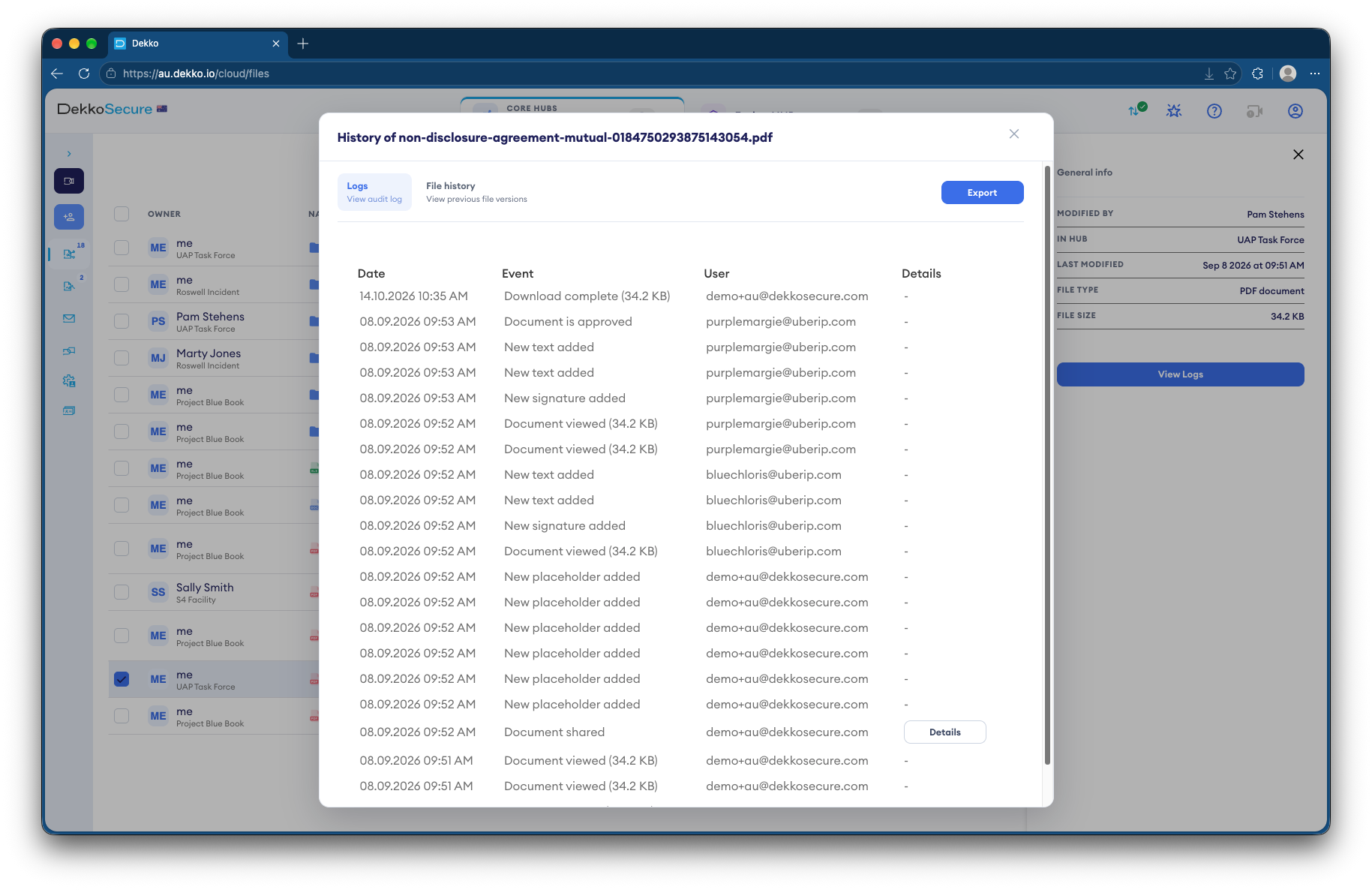
DekkoCORE file history listing each view, signature, approval and download with the date and the user
Each file's own history. Views, signatures, approvals and downloads, logged with the date and the user.

Protections

What your security and legal teams will ask.

  • Zero-knowledge, end to end

    Files are encrypted on the device that uploads them. DekkoSecure can't open your compound data, and neither can anyone outside the share.

  • Partners walled off

    Partners join as External Members. They see your team, never each other, and only the folders shared with them.

  • Hosted where your agreements say

    DekkoCORE is hosted in-country in Australia, the United States and Canada.

  • IRAP assessed

    Assessed for Australian government information up to PROTECTED.

  • Sign-in you can enforce

    Two-factor authentication, passkeys with hardware attestation and single sign-on for everyone in your tenancy.

  • Every upload scanned

    Malware scanning over ICAP checks files from partners as they arrive. Infected files can't be downloaded or shared.

In the product

Shared at a level, read without a copy.

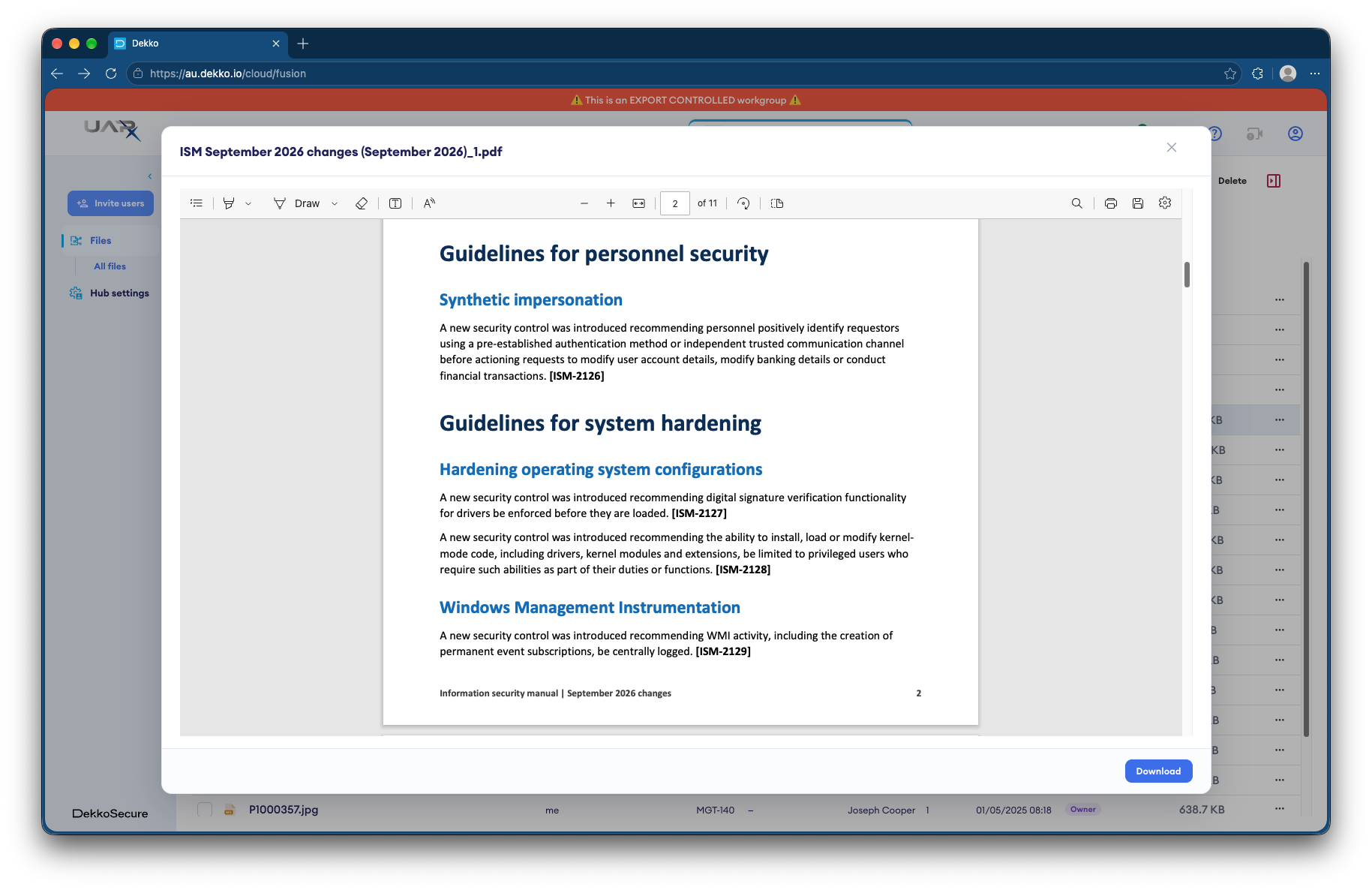
A PDF open in the DekkoCORE secure viewer, with page navigation, drawing and annotation tools and a Download button
Read it, without a copyThe secure viewer opens PDFs, Office files, images and video in the browser, so a partner can read the process description and keep nothing.
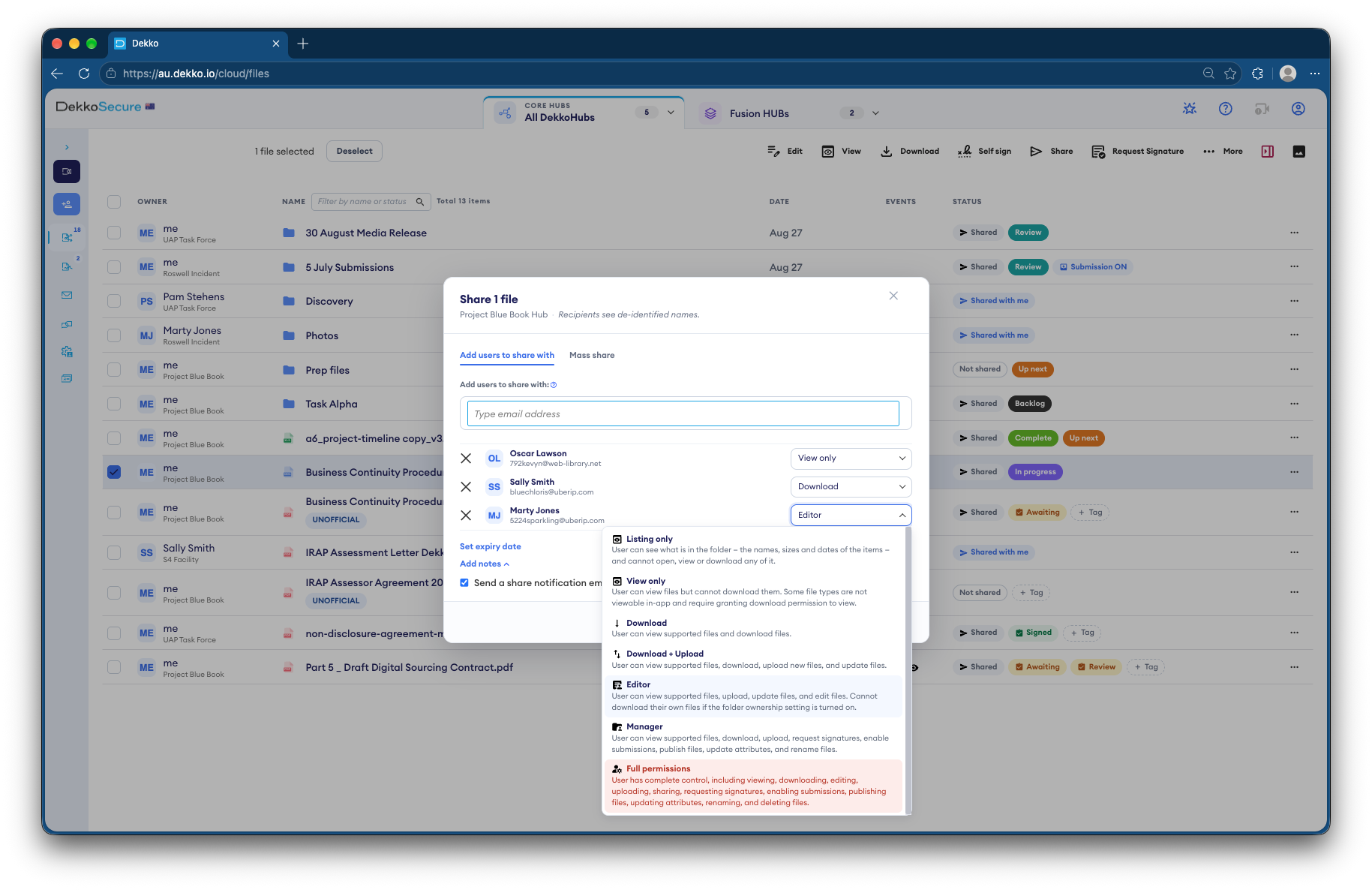
The DekkoCORE share dialog with a recipient's permission menu open, listing Listing only, View only, Download, Download and Upload, Editor, Manager and Full permissions
A level for every partnerChoose each partner's access when you share, from listing only to full permissions, with an expiry date in the same step.

Questions

Asked by R&D, legal and security teams.

Does DekkoCORE replace our ELN, LIMS or eTMF?

No. Your validated systems stay the record. DekkoCORE handles the files that move between you and your partners: protocols and process documents going out, results and batch records coming in, and unblinded data going only where it should.

Can our CROs see each other?

No. Partners join your Hub as External Members, who see your Team Members but can't see or contact other External Members, even when the same file is shared with them.

How do we share IP without a partner keeping a copy?

Share it View only, so it opens in the secure viewer with nothing to download, under a handling banner, with an expiry date that matches the agreement. No system can stop someone photographing a screen, but View only leaves no file to forward, and every view is recorded.

Can a CRO send us results without an account?

Yes. Share a secure submission link or QR code, which needs no account. For partners you work with throughout a program, share with their own account instead.

How do we keep unblinded data from our own study team?

Share the folder only with the unblinded statistician and the safety board. Your study team isn't given access, and the file's history shows everyone who opened it: the evidence that the blind held.

Do partners need a DekkoSecure subscription?

No. Partners are invited by you and register a DekkoSecure account to take part. Their own organisation doesn't need a subscription.

Where is program data stored?

In-country in Australia, the United States or Canada, so data can stay where your agreements and approvals require.

Bring us your partner list.

Tell us who works on one of your programs and how files reach them today. We'll set it up as a Hub, with a folder for every partner and the access each one needs.