

Defense primes · Contract managers · Data managers
Track every contract data item, with the register built from the files themselves.
Defense primes tag each deliverable with its CDRL number, deliverable, version and classification in a Fusion HUB. The Index lists every item with its attributes, flags incomplete entries, and exports the register as CSV.
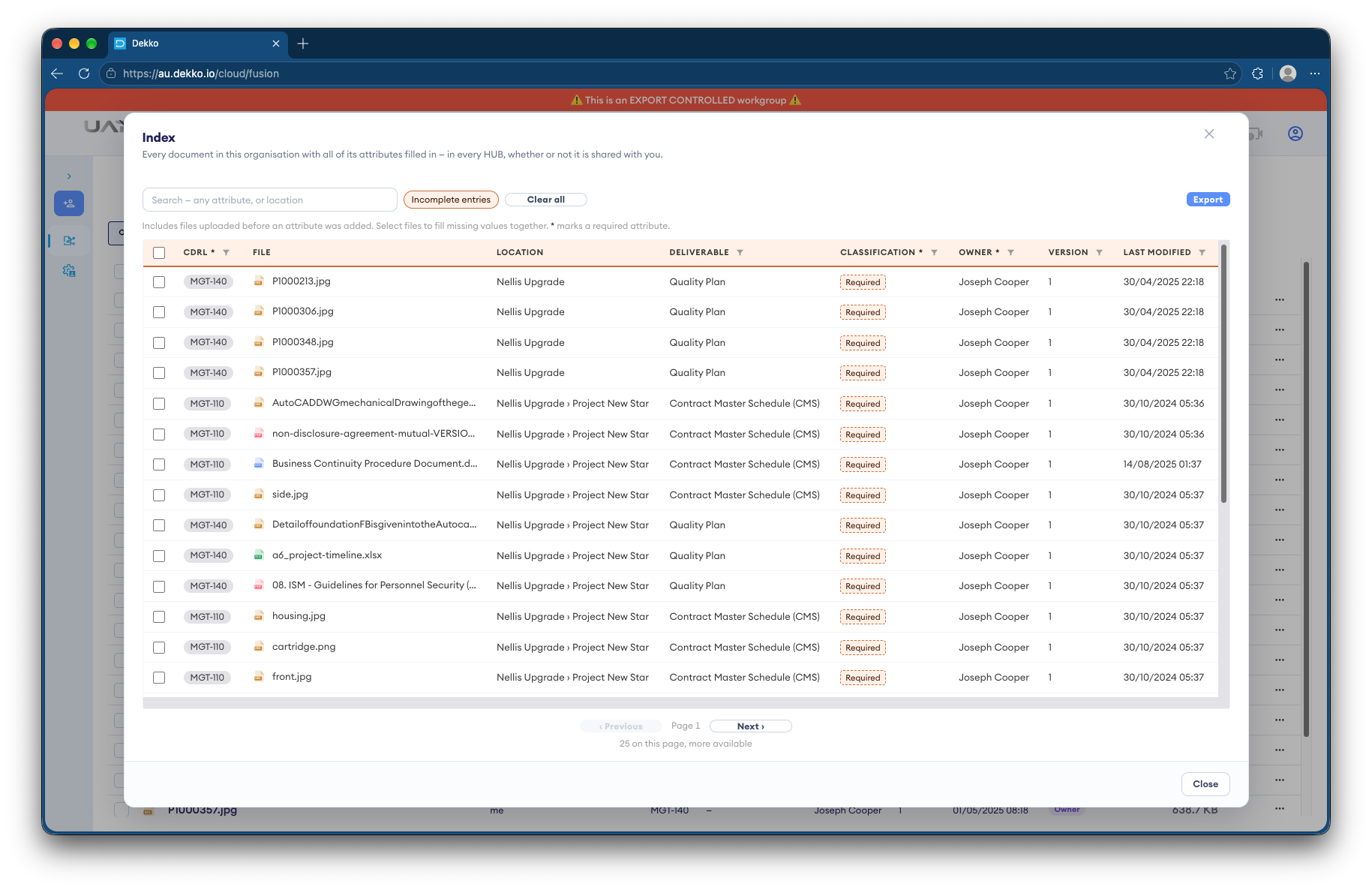
- Typed attributes
- CDRL number, version, classification and more.
- Set once
- Fields that can't change once set.
- Classification ceiling
- Enforced by the server.
- CSV export
- The register, ready to send.
Why CDRL registers drift
Primes deliver hundreds of data items over a contract's life, each with a CDRL number, version and classification. The register is usually kept by hand, apart from the files it describes.
Today
- Registers kept in spreadsheets
- Item numbers retyped by hand
- Classifications missing or wrong
- Files and register out of step
With DekkoCORE
- The register built from the files
- Typed attributes on every item
- A classification ceiling for each person
- Incomplete entries flagged
How it works in DekkoCORE
One contract, from the first data item to each delivery.
Step 1
Set up a Fusion HUB
Create a Fusion HUB for the contract, with a group for each team.
- Fusion HUB
- Groups
Step 2
Define the attributes
Set typed attributes such as CDRL number, deliverable, version and classification, and mark the ones that can only be set once.
- Index attributes
- Set-once fields
Step 3
Tag each item
Tag each file as it's uploaded. The Index flags entries with missing attributes.
- Index
- Incomplete entries
Step 4
Keep within ceilings
The server only shows each person index entries at or below their classification ceiling.
- Classification ceilings
Step 5
Export the register
Export the Index as CSV for your contract data reporting.
- CSV export
Who gets what access
A typical contract. You can change or remove anyone's access at any time.
Data manager
Full permissions
Sets up the attributes and the register.
Engineering teams
Download + Upload, by group
Produce and tag data items.
Contract manager
View only
Checks the register before delivery.
DekkoSecure administrators
Not shared
Locked out of your Index.
The bars show a permission level, from Listing only (one bar) to Full permissions (seven).
Questions
What is a set-once field?
An attribute that can't be changed after it's first set, such as a CDRL number, so each item keeps the identity it was delivered under.
What does a classification ceiling do?
Each person has a ceiling, and the server won't show them index entries classified above it.
Can DekkoSecure see our register?
DekkoSecure administrators are locked out of your Index, and your files are encrypted. Index attribute values, such as CDRL numbers and dates, are stored unencrypted so they can be searched, so keep sensitive content out of attributes.
What happens when someone leaves the program?
Removing them ends their access straight away. Anything they've already seen or downloaded isn't taken back.
Can we send the register to the Commonwealth?
Yes. Export the Index as CSV and format it as your contract requires.
Where is the data stored?
DekkoCORE is hosted in-country, in Australia, the United States or Canada.
Keeping a CDRL register?
Tell us how you track contract data items today. We'll show you the same register in DekkoCORE.